









Signal Over Noise Vol. 1: Travel-Ready Music Makers

The most restorative travel companions are often the quietest: a notebook, a good pen, a small device that lets you shape sound while the world moves around you. In an age of constant consumption, making something, however simple, can steady the mind in a way few amenities manage.
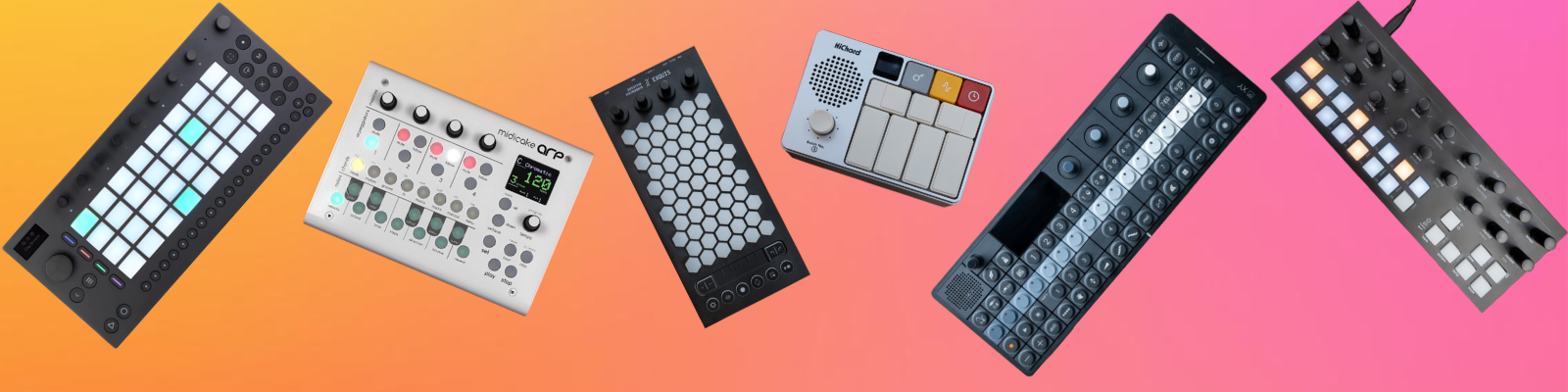
This first volume of Signal Over Noise focuses on compact music makers that slip easily into a carry-on or day bag yet invite real play: touch-responsive surfaces, pocket-sized sequencers, handheld samplers and controllers that turn a hotel desk, airplane tray, or café table into a small studio. We lived with these pieces on trains and in terminals, tested for true portability, intuitive learning curves, tactile pleasure, and how well they support brief, meditative sessions as well as deeper focus. Some favor structured pattern-building, others invite more freeform exploration, but all reward curiosity rather than training.
What follows are the instruments that travel lightly, reduce friction, and quietly return music-making to everyday life.
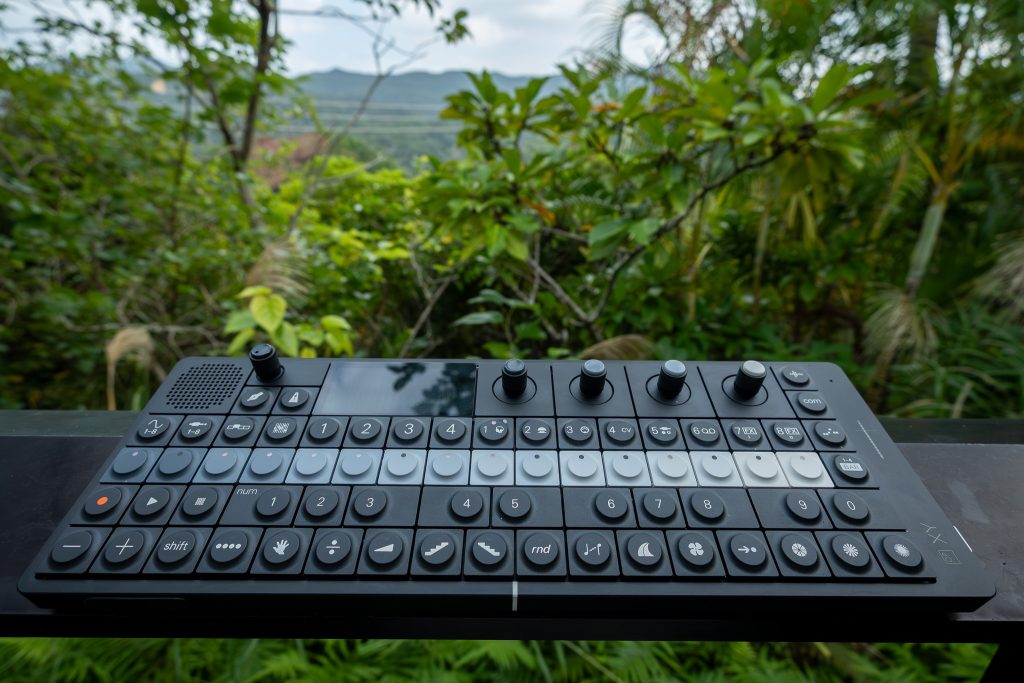
Teenage Engineering OP–XY Runs Hot and Cold
A dense black-aluminium sequencer-synth that can feel like a finished instrument, until the software reminds you it’s still settling.
- Best For: Producers who need a complete, portable sequencer and want tight control away from a computer.
- Feel: All-black, minimal chassis; low-profile mechanical buttons; calm grayscale interface with LED guidance.
- What Stands Out: 16-track, 64-step sequencing, deep step components, built-in CV/MIDI/sync options, and performance-ready Punch-in FX.
- What We Don’t Like: Grayscale-only UI and 16-track, four-page structure demand patience early on.
- Why Choose OP–XY: A no-compromise portable sequencer and performance instrument that stays serious even when the studio stays home.
Imagine building out a full song from a small café table, no laptop in sight, and still having the confidence that whatever you write will slot straight into your main setup later. That’s the kind of producer OP–XY is chasing: someone who likes the OP–Z workflow, but wants it rebuilt as a sequencer, sampler, and performance instrument with fewer compromises. The unit’s sequencing depth, project structure, and I/O lean toward people who think in patterns, scenes, and songs, then want those ideas to survive the trip back to the studio. During my first setup one evening, it felt like it wanted to get out of the way quickly: power on, start a pattern, and keep moving. Teenage Engineering claims up to 16 hours of battery-powered operation, which fits the mobile brief, even if real life varies with usage and updates.
The hardware design backs up that “carry it, use it, trust it” mission. OP–XY is all black, with the exact dimensions of the OP–1 field, and a distinct grayscale gradient at the center that helps the layout read at a glance. The 480 × 222 pixel IPS TFT display uses grayscale graphics, then hits you with bright red for recording and parameter locks, which is the right kind of visual urgency. Vital keys have LEDs, and the 68 ultra low-profile mechanical buttons feel crisp and consistent under your fingers during longer programming passes. A two-octave keyboard keeps melodic work practical without pretending it’s a piano. The pressure-sensitive pitch bend control on the bottom left has a controlled, deliberate response in use, more like a performance surface than a gimmick. On the right side, the advanced I/O layout makes the device feel prepared for real rigs, not just headphones at a coffee shop where I first tested it with a single synth and a pair of travel monitors.
In practice, OP–XY’s core argument is sequencing authority in a portable form. The 16-track, 64-step sequencer spans four pages, with 9 patterns per track, 99 scenes, and song mode supporting 9 songs per project. Patterns can stretch up to 64 bars across those pages, and tracks can run at different speeds and lengths for polyrhythms. Parameter locks felt smooth when I pushed automation across steps, and the 1920 PPQN resolution supports fine timing work without the “grid fight” that can happen on simpler boxes. Step components are the deep end: 14 types, and you can stack all 14 on a single step, which turns a basic loop into something that breathes and mutates. The trade-off is early navigation friction, since it takes time to build muscle memory around 16 tracks and four pages, especially in a grayscale interface. After a couple of late-night sessions, I still had to stop occasionally and check which page I was on.
Value, here, lives or dies on whether its premium positioning buys genuine independence from a computer. Teenage Engineering frames OP–XY as a no-compromise, dual-CPU boosted, fully rebuilt sequencer with built-in CV, effect sends, and what they call best-in-class DAC, plus “probably the most complete, portable sequencer” they’ve ever built. After living with it across a few longer sessions at home and in a shared studio, that ambition reads as coherent: eight instrument tracks and eight auxiliary tracks can steer external synthesizers or modular gear, while onboard sound engines, drum and multi-sampling, and instant sampling keep you composing even when nothing else is connected. Six built-in effects, two sequenceable FX slots, independent sends per track, and 24 Punch-in FX encourage performance thinking, while the Brain function and groove settings help break dead patterns. Without a published price here, OP–XY still clearly sits in the premium bracket implied by its “field” ecosystem positioning and pro retailer distribution. For producers who already own a capable laptop and DAW and mainly work at a desk, that level of investment will be hard to justify over more affordable grooveboxes. For committed hardware-first users who want a single portable brain that can travel easily, talk to modular, and then drop into a serious studio without feeling like a toy, OP–XY feels like a fair trade: you’re paying for depth, integration, and flexibility rather than a bargain, and it delivers on that brief.
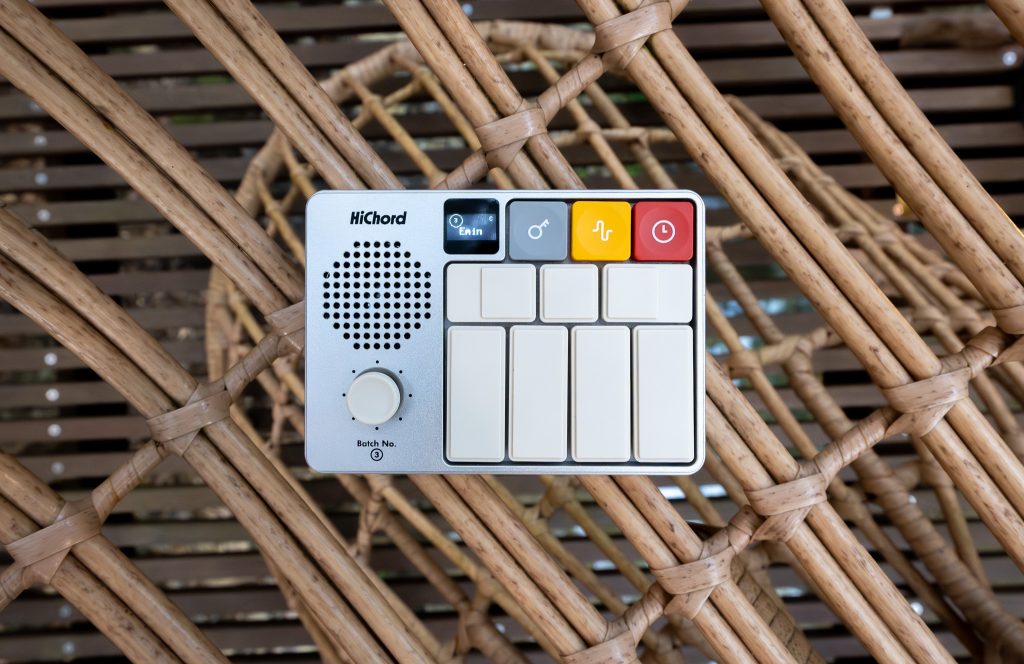
Pocket Chords, Real Songs
A pocket-sized chord synth, looper, and drum machine that makes songwriting feel immediate, with just enough depth to keep you up late.
- Best For: Songwriters and performers who want portable chord progressions without needing deep theory.
- Feel: CNC anodized aluminum, dense and durable, with simple, game-like controls.
- What Stands Out: Nashville Number System chord buttons, joystick chord mods, dual-track looper, drum machine.
- What We Don’t Like: Tiny OLED plus occasional firmware-update friction; keep it charged to avoid low-power audio glitches.
- Why Choose HiChord – COSMIC BLUE Aluminum Edition (Batch #4): A chord-first pocket synth that sketches full ideas standalone, then plugs into a DAW over USB-C MIDI.
You know that moment when a chorus shows up in your head at the worst possible time, on the train, in a backline green room, half-asleep on the couch, and you either hum it into your phone or just hope it comes back later? HiChord lives in that space. It is built for songwriters, bedroom producers, and working musicians who think in progressions and sections, not in scales and fingerings. The whole pitch is Nashville Number System mapping, so the seven chord buttons track diatonic chords inside whatever key you choose, and the device keeps everything harmonized so you are not hunting for “safe” notes. That is not magic, it is design, and it is the reason this thing took off as a shareable, pick-up-and-play object. After a few minutes on the couch, it stopped feeling like a gimmick and started acting like a notepad that pushes you forward.
The COSMIC BLUE Aluminum Edition I used is the final color run, sold as the most limited yet, and it looks and feels like a more serious object than the marketing copy suggests. The anodized aluminum chassis is pocket-sized at about 100 mm x 71 mm x 28.65 mm, and it rides in the included EVA case without asking for special treatment. The interface is the point: seven dedicated chord buttons, a chord-modifying joystick, a volume scroll wheel, and a power button, all tied to a small 0.49-inch OLED that keeps you oriented. Once the mapping clicks, the joystick becomes the musical muscle, flipping to minor, pushing into sus flavors, or extending into 7ths and 9ths in real time. Layer in the dual-track looper and the built-in drum machine, and it starts to resemble a complete workflow, not a toy.
Sound-wise, HiChord has enough engine under the hood to justify the “professional-grade” posture. It runs a high-performance DSP up to 96 kHz, driving a synth architecture described in terms like 12 digital oscillators, FM synthesis, and 16-bit samples, with waveforms such as sine, square, sawtooth, triangle, and custom options. The built-in effects roster is deep for something this small, with ADSR envelope control, tremolo, delay, lowpass filter, and LFO modulation that made it easy to move from clean chord pads to something more animated. The built-in speaker is handy for sketching, but I did most real judging on headphones and through AUX out to a larger speaker. USB-C MIDI out worked cleanly with my laptop setup for capturing progressions into a DAW. The only momentum-killer I hit was audio cutting out once when the battery was low, which tracked with the device’s known low-power behavior. Firmware updates are there via a web-based updater, but getting into the right mode took patience.
At $320, HiChord sits in an awkward place if you approach it like a mini studio. It is not that, and it should not be graded like one. The value is in how quickly it turns “I need a chorus” into an actual chord loop with drums, then lets you reshape harmony on the fly without staring at a piano roll. The aluminum build and the integrated speaker and OLED make it legitimately standalone, and the USB-C MIDI keeps it from becoming a dead-end sketchpad. Still, the small screen asks you to trust muscle memory, and the combination of firmware-update friction and the possibility of low-battery audio dropouts means I would not treat it as a zero-risk live centerpiece. Buy it if you write chord-based music and want a portable, key-agnostic writing tool that can graduate into your DAW. Skip it if you need traditional keys, deep sound design, or absolute set-and-forget reliability.
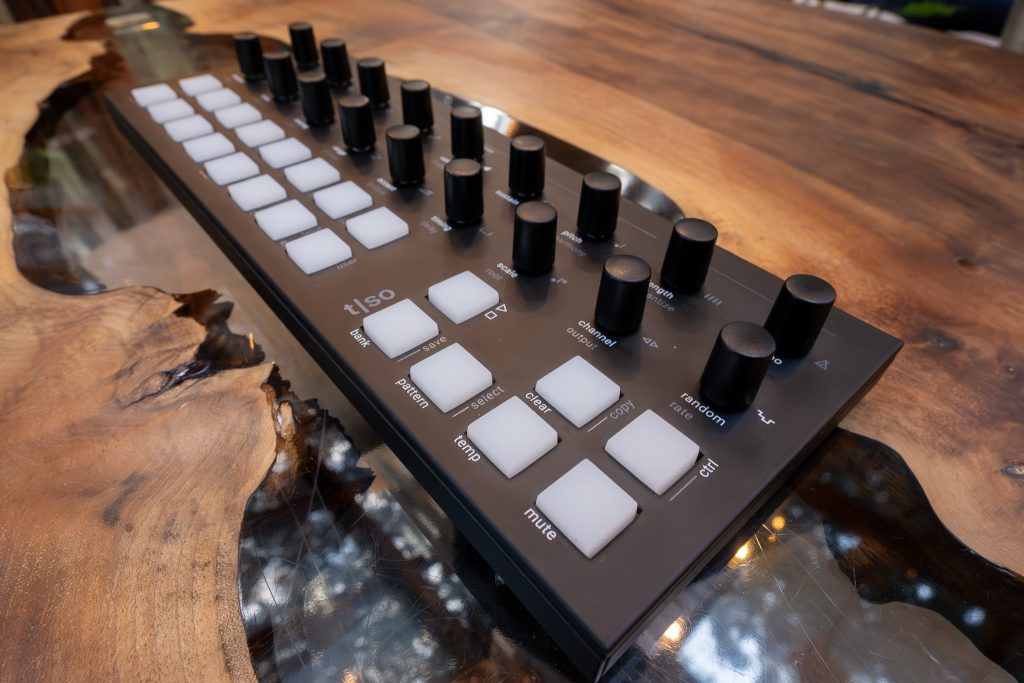
Torso T1, If You Let It
A matte-black, hands-on generative instrument that rewards wandering, as long as you accept its screenless logic.
- Best For: Electronic musicians building algorithmic workflows across hardware synths, modular systems, and DAW setups.
- Feel: Matte black aluminium; dense and desk-stable; silicone RGB pads; 18 endless encoders with push.
- What Stands Out: 16 tracks in Note/CC/FX modes, Euclidean rhythms, melody tools, repeater and arpeggiator, random modulation, 256 patterns.
- What We Don’t Like: The interface asks for commitment; mode-switching and encoder logic take practice. Auto-save changes habits, so work methodically.
- Why Choose T1: A playable, generative sequencer that can sit at the center of MIDI, USB, CV/Gate, and Link-synced setups.
You know the moment: you hit play and suddenly you’re not really composing anymore, just babysitting patterns, nudging clips, and managing which box is in charge of what. The Torso T1 is built for the opposite. It’s an algorithmic sequencer, and Torso Electronics frames it as a device meant to enter a creative dialogue with you, sparking ideas and pushing variations in the moment. In practice, the 16-track architecture is the foundation. Each track can live in Note, CC, or FX mode, so one pattern can cover pitched lines, automation lanes, and performance-oriented MIDI effects without feeling like three separate tools fighting for attention. In my first evening with it, switching a track from Note to CC halfway through a loop shifted the whole pace of writing. I stopped thinking in rectangles on a piano roll and started thinking about shaping motion over time, which suits this instrument.
The physical design supports that instrument-like posture. The matte black aluminium casing feels honest and workmanlike, and at 304 x 114 x 39 mm it takes up a deliberate strip of desk space without sprawling. At 815 g, it has enough weight that it stays put when you get busy with the controls. When I first lifted it out of the box, it felt closer to a well-made desktop mixer than a flimsy controller. The interface is dense but coherent once your hands learn it: 18 endless rotary encoders with push function, paired with 23 RGB backlit silicone keypads that serve as clear visual anchors for what’s active and where you are. The RGB lighting reads as functional feedback rather than decoration, particularly in a dim room. Cabling stays straightforward because power and MIDI can run over USB-C, and traditional MIDI in/out/thru is available on TRS Type A. The box includes the unit, a USB cable, and a Type A MIDI adapter, which meant I could go from unboxing to first pattern without hunting for extra parts.
The T1 earns its keep when you lean into the algorithmic feature set without giving up control. Euclidean rhythm generation gets you to a playable grid fast, and step editing keeps it from feeling like a slot machine. The melody generator, arpeggiator, and advanced note repeater are best treated as compositional partners: generate, constrain, then refine. On a quiet afternoon, I built a simple Euclidean drum pattern, added a melody line from the generator, and then spent twenty minutes trimming steps and adjusting repeats until it felt intentional rather than clever. Scale handling is practical, with seven preset scales plus one user-defined scale per track, and harmonic pitch control helps keep generative runs from drifting into nonsense. Random modulation can be applied to every parameter, which is powerful and occasionally chaotic, but the device gives you a safety valve. Relative parameter changes can be made across one or multiple tracks, then saved or reverted, a small design decision that encourages risk. Auto-save reinforces that iterative style; after one session where I instinctively looked for a manual “save as” that didn’t exist, I learned to move a bit more deliberately.
The T1 makes the most sense as a centerpiece for people who want variation as a musical material, not as an accident. Its strongest quality is how intentionally it balances generative play with editability: algorithms can sketch, step editing can finish, and polyphonic tracks prevent the whole thing from collapsing into monophonic sketches. Pattern depth also matters here. With 16 patterns per bank and 16 banks, you have 256 patterns available at any time, enough to treat the device like a setlist as well as a notebook. In my own setup, it sat between a laptop and a small modular rack, sending MIDI on multiple channels while feeding CV and gate to a single voice, and it felt naturally central rather than like an add-on. Connectivity is equally grown-up: 16 MIDI channels, USB-C MIDI, TRS Type A MIDI in/out/thru, CV and gate I/O for analog systems, plus Ableton Link over Wi‑Fi for tempo sync in a DAW-centered room. The drawback is the same thing that makes it distinctive. This is a rethinking of what sequencing feels like, and the 18-encoder, three-mode language takes time. If your ideal workflow is traditional step programming and nothing else, a simpler grid will feel calmer. If the T1’s cost fits your budget, it rewards the investment with a kind of momentum that carries through both long studio days and live, on-the-fly variation.
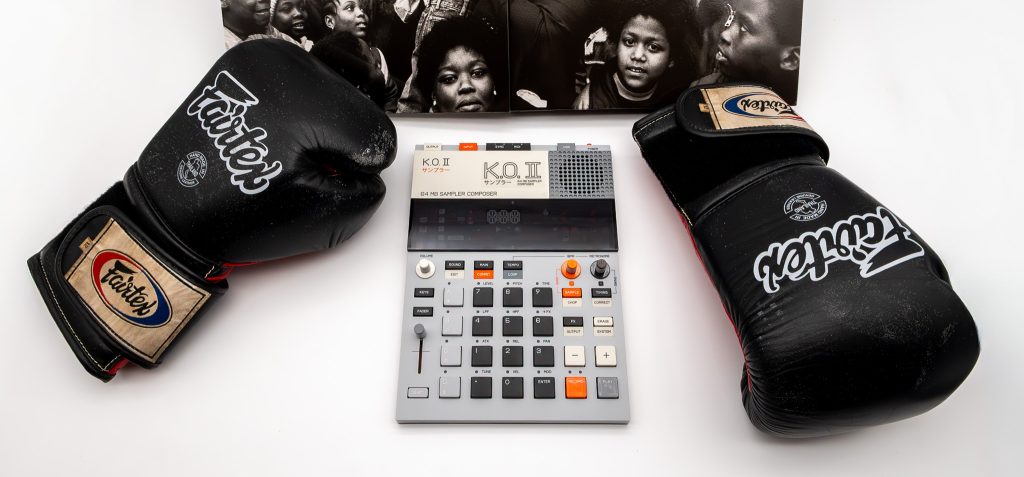
Teenage Engineering EP–133 K.O.II: Fast Enough for Your Ideas
A portable beat machine that treats sampler culture like a living tradition, then asks you to work fast enough to deserve it.
- Best For: Beatmakers who want a battery-powered sampler that can still run a serious pattern-based workflow.
- Feel: Light, flat, bag-friendly; pressure-sensitive keys and a central fader invite hands-on play.
- What Stands Out: Built-in mic and speaker, punch-in effects 2.0, group-based sequencing, and fast creation without a screen.
- What We Don’t Like: No detailed visual editing; reported early-batch fader fragility makes you handle it thoughtfully.
- Why Choose EP–133 K.O. II: It brings Teenage Engineering’s pocket-sampler spirit into a more capable, performance-minded box.
There’s a particular kind of frustration in loving the immediacy of tiny samplers but knowing, deep down, that they’re never going to be your main instrument. Either they vanish into a bag and leave depth behind, or they grow up into full-sized boxes that don’t really want to move. The Teenage Engineering EP–133 K.O. II arrives as a sampler and composer that tries to stop treating that trade as inevitable. It’s positioned as a more capable successor to the pocket-sized PO-33 K.O! line, with a larger footprint and a broader ambition. At 240 × 176 × 16 mm and about 620 grams, it’s still plausibly mobile, just no longer pocket-anywhere. The bigger question is whether the EP–133’s design choices, especially a deliberately screenless interface, can deliver speed and musicality without turning “portable” into “limited.” Its premium positioning also means the industry’s usual small-device forgiveness doesn’t apply.
The EP–133 makes its case through touch. The pressure-sensitive keys encourage playing parts in, not just programming them, and the multifunction fader becomes the instrument’s hinge point for shaping and moving sound. In my first session, I sampled a quick percussive noise through the built-in microphone, checked it back on the built-in speaker, then moved into chopping and arranging with the fader and button combos. There’s sampling via the 3.5 mm input too, and the audio engine is specified at 46.875 kHz, 16-bit, with an internal 32-bit floating-point signal chain. Punch-in effects 2.0, twelve of them, are the workflow innovation that actually changes behavior: you stop “editing,” and start performing choices in real time. Add six master effects, a distortion and FX section, and a master compressor, and it leans into momentum over microscope detail.
Living with it is where the portability argument gets real. Power comes from four AAA batteries or USB-C, and the manual is fussy in the right way about using fresh batteries of the same type and inserting them correctly. I found myself treating it like two devices: batteries for quick, self-contained sessions, USB-C when it’s on a desk and I’m syncing it to other gear. Connectivity is broad for something this slim: stereo 3.5 mm in and out, MIDI input and output, sync input and output, plus USB-C for linking into a DAW-oriented setup. After a firmware update, sync behavior felt steadier, including the return of continuous sync out clock, and general UI, LED, MIDI, and sampling quirks were less of a distraction. The main daily friction is the lack of a screen. It forces fluency, which can be satisfying, but detailed visual editing just isn’t the point here.
The EP–133 K.O. II resolves the portability-versus-capability tension better than most boxes that claim to, as long as your idea of capability includes performance and composition, not forensic editing. The group-based sequencing and variable pattern length per group keep arrangements from feeling boxed in, and each pattern’s twelve tracks can carry samples or MIDI. Projects are plentiful, nine total, with up to 80,000 notes each, and the sampling capacity is presented in the official guide as 128 MB, though some listings describe it differently. Polyphony is also described inconsistently in the market, so I wouldn’t buy it for a specific voice-count promise. The buy decision comes down to character and tolerance: the EP–133 feels like a genuine Teenage Engineering instrument, opinionated, playful, and fast, but user-reported early-batch fader fragility adds a small shadow to every confident swipe. If you want a portable sampler that rewards muscle memory and live instinct, it earns its place. If you need a screen, or you demand tank-like controls at this price tier, look elsewhere.
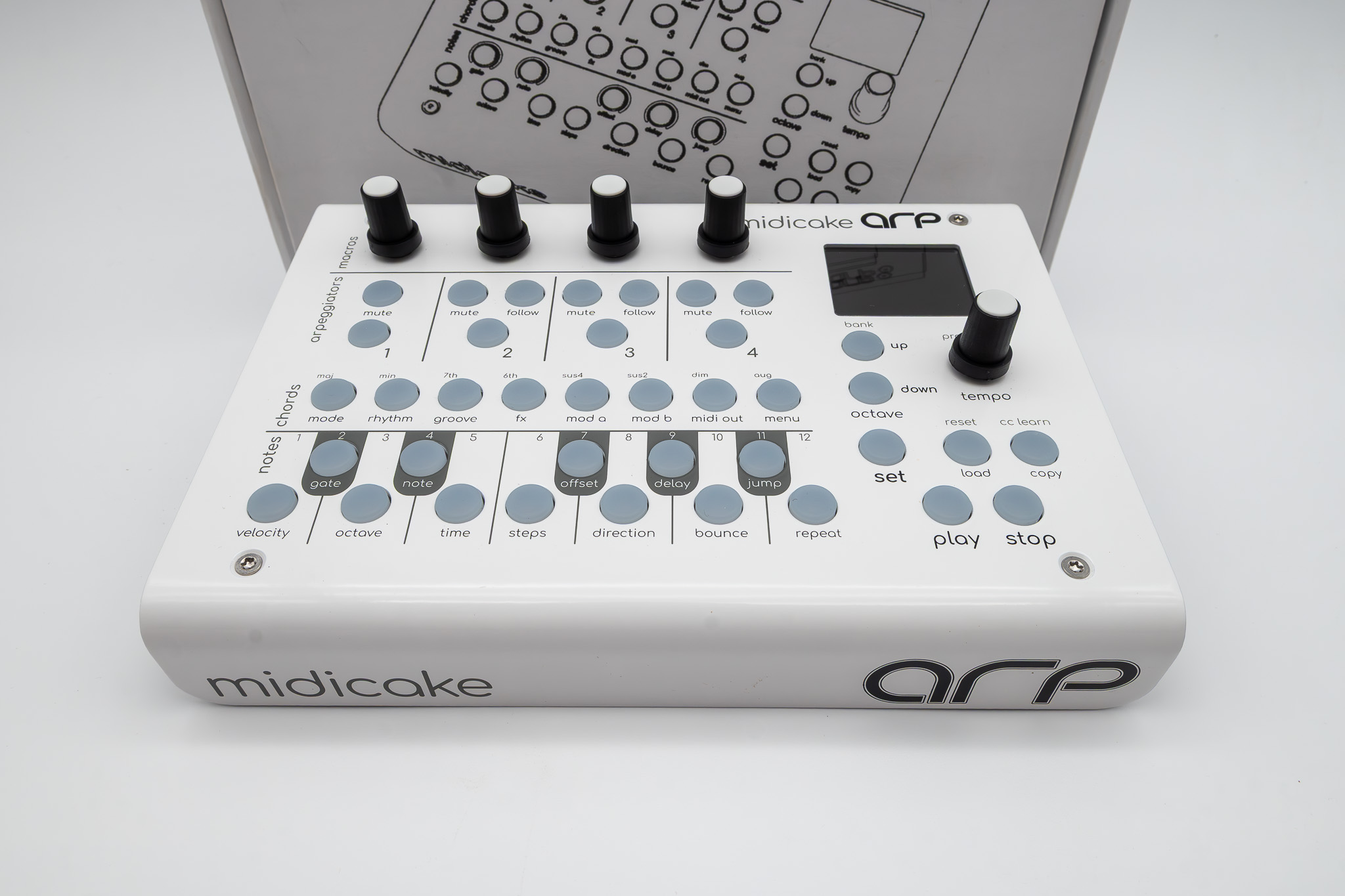
Midicake ARP Wants Your Intent
A four-track arpeggiator and sequencer that insists on intention, then rewards it with repeatable complexity.
- Best For: Producers who want four synchronized MIDI parts with chord and scale control, plus repeatable “generative” motion that still obeys rules.
- Feel: Solid, studio-minded hardware with performance-ready macro knobs and a layout that rewards patience.
- What Stands Out: Four “Melody Machines,” chord chains with voice-led inversions, deep real-time parameter control, and MIDI CC modulation duties.
- What We Don’t Like: The depth can feel like a thicket at first, and buying used requires attention to hardware revision differences.
- Why Choose Midicake ARP: It’s a multi-track arpeggiator that behaves like an instrument, not a slot machine.
At some point you stop wanting happy accidents and start wanting a machine that will do exactly what you told it to do, every single time. That shift, away from dice-roll generative tricks and toward controlled complexity, is where Midicake ARP lives. Out of the box, the intent is legible: USB-B for power and MIDI over USB, standard 5-pin DIN in and out, and MIDI Thru for daisy-chaining. There’s also a USB-A host port for a keyboard, which immediately changes placement decisions. Mine ended up angled toward my left hand, with the cables routed away, like a small console that expects to be touched. The chassis feels designed for long-term residency rather than constant packing and unpacking, closer in spirit to a well-sorted studio rack than a pocket gadget.
In use, the headline is how much musical structure ARP can impose while still feeling alive. Each of the four arpeggiators is polyphonic and can run simultaneously or in sequence; by default they work in sync and harmony, then you pull them apart when the arrangement needs friction. The chord and scale engine gives immediate access to thousands of chords and scales, plus custom chords, and it feeds a chord chain sequencer for automatic progressions. The clever part is how voice leading and chord inversions keep transitions smooth, so harmonic movement doesn’t sound like a hard cut. I spent an evening in Live Play mode, letting sequences run automatically as I played chords, then kept editing parameters without stopping playback. The depth is real: dozens of real-time parameters, binary patterns for rhythmic variation, dual modulation (Mod A and Mod B), and an FX parameter that adds pseudo-random variation you can repeat on demand.
Day to day, ARP behaves best when you treat it like a small system rather than a single trick. Patch storage is generous at 192 patches across 16 banks, and the practical pleasure is recalling a known starting point mid-session, then pushing it with the four macro knobs you’ve assigned to matter. Those macros are where the instrument feeling shows up; a good mapping turns a static pattern into something you can perform. Integration is broad and refreshingly unsentimental: it syncs to external MIDI clock or runs its own internal clock and sends MIDI clock out, each arpeggiator can transmit on its own MIDI channel, and Program Change support makes remote patch switching viable. MIDI CC learn is the bridge to external controllers, and ARP can also act as a MIDI CC LFO machine, which is easy to underestimate until a “sequencer” starts moving other hardware’s parameters with intent. Midicake Connect, the web app, makes patch management and visualization feel less opaque.
The value question lands differently depending on temperament. At the regular £335 price, with a currently advertised winter sale at £299, Midicake ARP earns its keep if you want disciplined complexity: evolving lines, bass parts, arpeggios, pads, drones, even percussion patterns, all generated without tedious programming and without relying on pure randomness. The best quality is coherence across four channels, helped by chord and scale synchronization that keeps harmony intact even as rhythm and modulation get intricate. The drawback is the obvious one: forty-plus parameters, multiple input modes (ARP Default, Classic Arpeggiator, One Finger), and deep modulation mean the first days feel like learning a new city’s street plan rather than strolling a familiar neighborhood. Manuals, tutorials, and forum support soften that, and firmware is updateable via USB with an emphasis on regular upgrades. If you crave simple, immediate arpeggios, this is probably more architecture than you want. If you want a studio centerpiece that stays interesting because it stays repeatable, ARP has an enduring kind of usefulness.
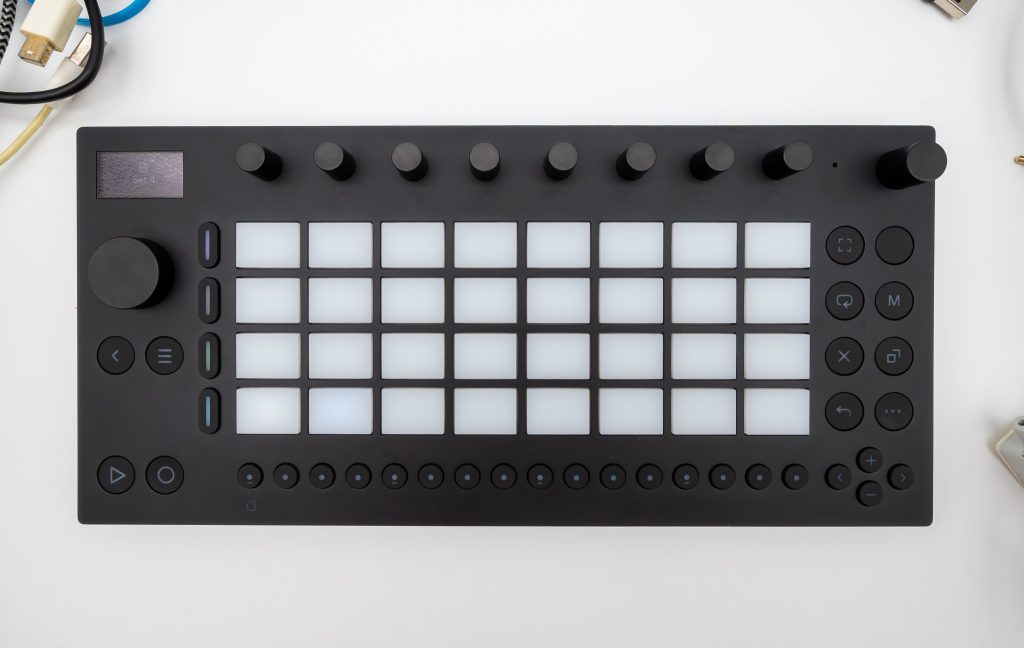
Ableton Move, The Little Lobby of Ideas
A standalone groovebox that promises a warm welcome, then asks you to learn its small print.
- Best For: Musicians who want a battery-powered sketchpad for beats, samples, and synth ideas, then a clean handoff into Ableton Live or Ableton Note.
- Feel: Solid, travel-ready hardware with satisfying controls; the touch-sensitive encoders and clickable wheel invite quick tweaks without fuss.
- What Stands Out: Four configurable tracks, a fast step sequencer, 16-pitch drum transposition for melodic lines, and Wi‑Fi Set transfer through Move Manager.
- What We Don’t Like: The small 1.3-inch OLED can slow deeper edits, and the multi-function button logic takes a minute to internalize. Windows 10 users may need a Wi‑Fi update (v1.1+) before USB‑C works with Move Manager.
- Why Choose Move: It’s a hospitable bridge between spontaneous hardware creation and finishing inside Ableton Live, without turning setup into a project.
There’s a specific kind of relief in grabbing a box, hitting one button, and being halfway into a track before your inner critic even wakes up. No menus, no project templates, no decision paralysis—just enough structure to make the next move obvious instead of precious. That’s the lane Move lives in.
Move is a standalone, portable music-making device that gets straight to the point: four tracks, each set up as a drum kit, sampler, or synthesizer, plus a step sequencer that invites you to build patterns before you can second-guess them. Starting a new Set loads four random instrument presets, which sounds like a gimmick until you realize it’s a small act of creative hospitality. You can keep what’s offered or swap it out quickly, then push drums beyond “drums” by transposing samples across 16 pitches for basslines or simple melodies. Midway through my first session, that one feature did more to keep momentum up than any inspirational slogan. Effects including reverb, delay, and saturator are close at hand, so sketches land with a little finish instead of sounding like dry placeholders.
The interface is designed for fingers, not a mouse, and that matters when you’re meant to use it away from a desk. Move’s 1.3-inch white OLED (128×64) is small but legible, and it pairs with a touch-sensitive, clickable wheel that keeps navigation quick once your muscle memory kicks in. The nine high-resolution, touch-sensitive encoders feel like the heart of the instrument; they encourage gentle, incremental changes rather than wild swings, and the device rewards that kind of careful tuning. Backlit buttons are split between 16 multifunction buttons for sequencing and secondary features, and 20 primary buttons for navigation, recording, and looping. That division keeps the surface tidy, though I did have a brief “where did that function go?” moment early on, staring at the OLED while re-learning which shift layer I’d just invoked.
In everyday use, Move behaves like a self-contained room with the lights already on. The built-in speaker is enough to monitor an idea without hunting for cables, while the 3.5 mm stereo output makes headphone work easy when you want to get serious. Sampling is flexible: there’s a built-in microphone, plus a 3.5 mm stereo input that can take an external source, including plugging in a phone to record audio for sampling. On battery, Ableton rates it for up to four hours, and that’s the right order of ambition for a portable box you’ll grab between errands, flights, or an evening on the sofa. Integration is the other half of the promise: Wi‑Fi enables transferring Sets to Ableton Live and Ableton Note through Ableton Cloud and Move Manager, accessed at http://move.local/. The first transfer took a moment, then it became routine.
At $499, Move earns its keep when you value the full arc: quick capture on hardware, then refinement in Ableton Live. The included license for Live 12.1 Intro softens the entry price if you’re not already in the ecosystem, and the tight controller relationship with Live means the box doesn’t become dead weight once you sit back down at a computer. The sound library helps, too: over 1500 sounds, with content created by Ableton’s sound design team and collaborations that include BNYX, DECAP, L.Dre, and Sound Oracle. The main drawback is the same trade-off that makes it portable: a small screen and layered button functions can slow you when you’re trying to micromanage details. If you want endless tracks and big-screen editing on the device itself, look elsewhere. If you want something that welcomes ideas quickly, then escorts them into Live without drama, Move is a thoughtful, genuinely usable host.
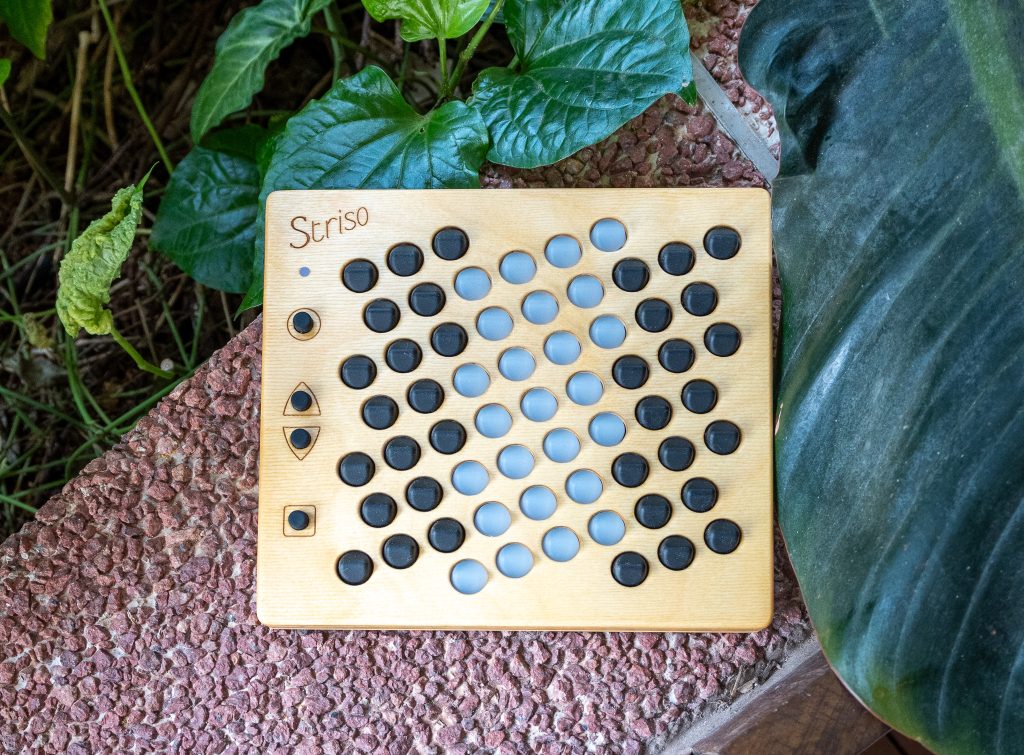
Striso Board Rethinks The Keyboard
A compact, multidimensionally sensitive controller that treats theory, touch, and tuning as one connected proposition.
- Best For: Experimental musicians and microtonal players who want MPE expression and a Wicki–Hayden-related isomorphic layout
- Feel: 61 soft silicone, pressure- and direction-sensitive keys with a subtle horizontal ridge for orientation, set in a compact frame
- What Stands Out: Tuning-invariant grid, deep alternative tuning support, and multidimensional touch plus motion sensing over MIDI
- What We Don’t Like: 15-note MPE polyphony can cap dense harmony; USB-only power and a shared pedal/TRS MIDI jack require planning
- Why Choose Striso board: A small, Dutch-made controller that makes harmony shapes consistent and makes non-12-tet tunings practical on MPE synths
What if your main controller stopped feeling like a piano you never quite mastered and started behaving like a new instrument your hands could actually re-learn from scratch? The Striso board bets that most of what slows players down isn’t music theory, but geometry: if you fix the map between intervals and physical space, you can stop memorizing exceptions and start building muscle memory. That premise runs through both its layout and its playing surface. Its isomorphic note layout, closely related to Wicki–Hayden, keeps every interval, chord, and scale in the same shape regardless of key, and it genuinely changes how fast patterns settle into the hands. Major intervals sit to the right, minor to the left, and perfect intervals in the middle, so harmonic movement becomes spatial rather than memorized. The 61 silicone keys respond to pressure and subtle left–right and back–forth movement as changes in loudness, pitch, and timbre, and with a 1200 Hz scan rate it reacts quickly enough that small gestures register as intention rather than noise.
Design here serves performance directly. The board packs 61 multidimensionally sensitive keys across a 3.6-octave range into a footprint of 192 x 174 x 26 mm, and at 425 g it’s the rare controller I’ll actually leave on a desk instead of relegating to a case. The silicone keys have a distinctive feel, with a horizontal ridge that helps keep orientation when intonation and micro-movements start to matter. Early on, I found myself using that ridge like a reference point the way a string player uses position, especially when the layout stopped feeling like “keys” and started feeling like a grid. Four extra buttons handle glissando, octave switching, and settings, which keeps the surface clean but places a lot of responsibility on a small control cluster. The overall impression is boutique and purposeful, in line with other compact European instruments that prioritize focused capability over broad feature lists.
In daily use, the Striso board behaves like a serious hub for MPE rigs, with sensible options when you need to simplify. MIDI over USB is the main path, but there’s also TRS MIDI out on a Type A mini-jack, and a sustain or expression pedal input that shares that same jack, a compromise that’ll irritate anyone building a permanent hardware setup. There’s also a 3.5 mm stereo output suitable for headphones or line out, handy for quick checks without rearranging a desk. The unit supports multiple MIDI modes, including MPE with one note per channel, a normal mode with pitch bend, modulation, and polyphonic aftertouch, and a monophonic mode with glissando. Motion sensing sends 3D rotation and acceleration data over MIDI at 100 Hz, and tilting the board mid-phrase produced convincing accents and controlled instability, closer to physical performance than knob-twiddling. After a few sessions, I began to treat motion as another performance axis rather than a special effect.
The most distinctive strength, and the reason the Striso board warrants attention within the international field of alternative controllers, is its microtonal ambition executed with practical restraint. The layout is described as tuning invariant, with sharps and flats separated so alternative tunings can be played without the traditional traps, and the board can switch between 12-tet and a wide range of tunings including 31-tet, 19-tet, 1/4 meantone, pythagorean, 7-limit just intonation, Indian Shruti, Bohlen-Pierce, and user-defined systems. In my own playing, moving into a non-12-tet setting felt less like a novelty and more like a stable working environment because the controller sends deviations from 12-tet via polyphonic pitch bends, so these tunings remain usable with any MPE-enabled synthesizer. The main caution is bandwidth: 15-note polyphony, described as an MPE limitation, can constrain thick chord clusters. For experimental solo work, education, and microtonal composition, the Striso board earns its place. Traditional keyboardists wanting familiar geometry, higher polyphony, or battery-powered portability should look elsewhere, because this is a specialist instrument and happiest in specialist hands.
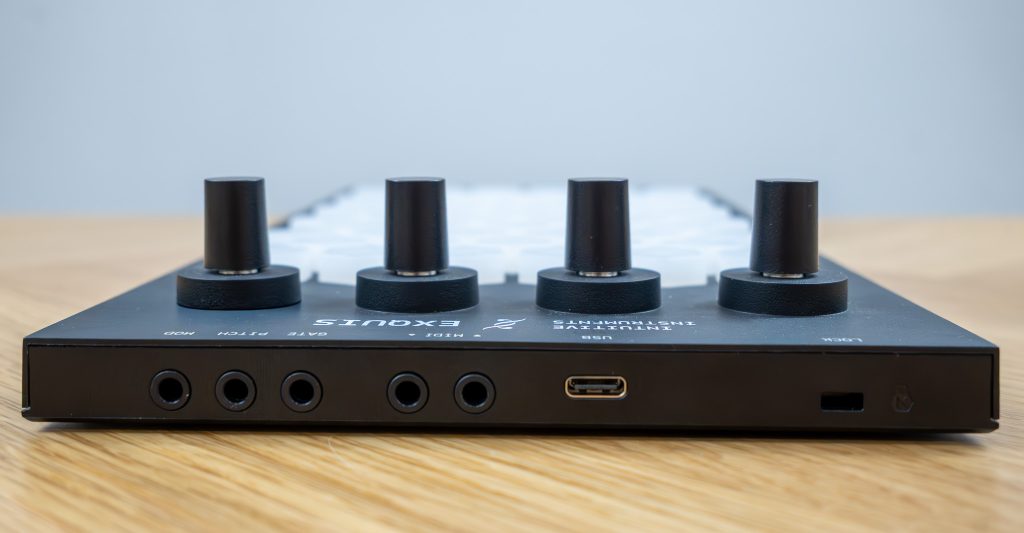
Hex Keys, New Habits
An MPE controller with a hexagonal, isomorphic grid that rewards curiosity, but asks you to commit to its ecosystem.
- Best For: Players who want MPE expressiveness with real MIDI I/O and 0–5 V CV outs for Pitch, Gate, and Mod in one compact controller.
- Feel: Silicone hex keys with a percussive-ready sturdiness, plus four clickable encoders and a silent capacitive touch slider.
- What Stands Out: Proprietary harmonic layout (thirds vertical, chromatic horizontal), scale illumination, and deep connectivity over USB-C, TRS MIDI, and CV.
- What We Don’t Like: CV follows only the most recent note in MPE mode; the Exquis app’s SysEx mode can clash with other MIDI software. Plan your routing.
- Why Choose Intuitive Instruments Exquis: It makes expressive playing, in-key confidence, and modular-friendly outputs coexist without turning the interface into homework.
MPE controllers often force a choice between raw expressive depth and an interface that feels immediately playable, and alternative layouts try to soften that tradeoff without always succeeding. Hex grids, in particular, promise geometric logic and repeatable shapes, but they can also feel like starting over after years of piano muscle memory. Exquis is Intuitive Instruments’ answer to that tension, with 61 velocity-sensitive hex keys that sense pressure plus X and Y position, then back it all with scale illumination and a proprietary harmonic layout where thirds stack vertically and chromatic steps run left to right. The idea is accessibility through structure, not through pretending this is a piano. After a short setup over USB-C at my desk in Noe Valley, the first friction wasn’t sound. It was whether my hands could trust a new map and whether the interface gave enough guidance to keep me moving.
The execution feels thoughtful in the way good kitchen tools are thoughtful: the control points land where your hands naturally return, and the feedback is immediate. The hex keys have a grippy silicone feel that handled my more percussive playing without losing sensitivity when I backed off into lighter pressure and small tilts. Those gestures map to the Z, X, and Y axes, and the board’s RGB or LED backlighting does real work when you switch scales, making in-key notes pop so you can improvise without constantly second-guessing. Getting there took a few minutes of learning the Image button plus encoder routine, but once it clicked, it felt like seasoning by taste rather than following a recipe. Exquis can store up to eight note layouts, and cycling through defaults like Chromatic, 4×4 for drums, and General MIDI percussion made the grid less abstract and more like a set of pans you actually reach for on a busy weeknight when you know where everything lives.
Daily practicality is where Exquis separates itself from many expressive controllers I’ve tried. USB-C handles power and data, and you also get MIDI input and output over 3.5 mm TRS, plus three dedicated CV outputs labeled PITCH, MOD, and GATE designed for 0–5 V control voltages. I patched Pitch and Gate into a modular voice on my studio shelf and immediately hit a real limitation: in MPE mode, only the most recent note drives the CV outputs, so it’s best to think of the CV side as expressive monophony rather than polyphonic control. The arpeggiator, paired with the six-zone capacitive touch slider and Freeze, becomes a strong consolation when you want motion without adding another sequencer box. The companion Exquis app goes further, with an 11-track looper and a sequencer with 11 chainable events, but connecting it flips communication into SysEx and keeps Exquis in MPE mode, where buttons and encoders stop behaving like standard MIDI CC sources. That mode also comes with a clear warning from experience: don’t run the app at the same time as other software expecting MIDI from Exquis unless you’re ready to troubleshoot conflicts instead of making music.
Exquis resolves the category tension better than most because it refuses the usual either-or and treats expressive control, layout, and connectivity as one system. The harmonic layout and scale illumination do the unglamorous work of keeping you oriented while you explore genuine MPE expressiveness, and the physical interface supports that with solid-feeling hex keys, four clickable encoders with illuminated feedback, ten backlit function buttons, and a touch slider that stays quiet and precise under the fingertips. In my studio, the size and weight felt closer to a favorite chef’s knife than a showpiece gadget: portable, sturdy, and easy to slot between laptop and modular rack. Connectivity is the second win: USB-C, MIDI I/O, and CV Pitch, Mod, and Gate make it viable in a DAW, with hardware, or next to a modular system, as long as you accept the CV behavior in MPE mode. Firmware v2.1 adds a Sustain mode that locks held notes and their XYZ positions via the fourth encoder, and it also brings an Ableton Live remote script, both of which sharpen the workflow if you live there. If you want plug-and-play familiarity or true polyphonic CV, look elsewhere. If you want one portable, robust controller that makes expressive control and modular integration feel like one coherent instrument, Exquis earns its desk space.